Architecture
NidanEHR integrates separate specialized systems (EMR, LIS, ERP, PACS, and reporting engine) at the container and event layers. This reference describes the component connections, data flows, and deployment structure.
Applies to
The current NidanEHR stack: OpenMRS 2.8.x · OpenELIS-Global 2 · Odoo 19 CE · Orthanc · Kafka
7.5 · Keycloak. Orchestration is defined by nidan-docker/docker-compose.yml. Component
versions are pinned there and in each component's build files.
System at a glance
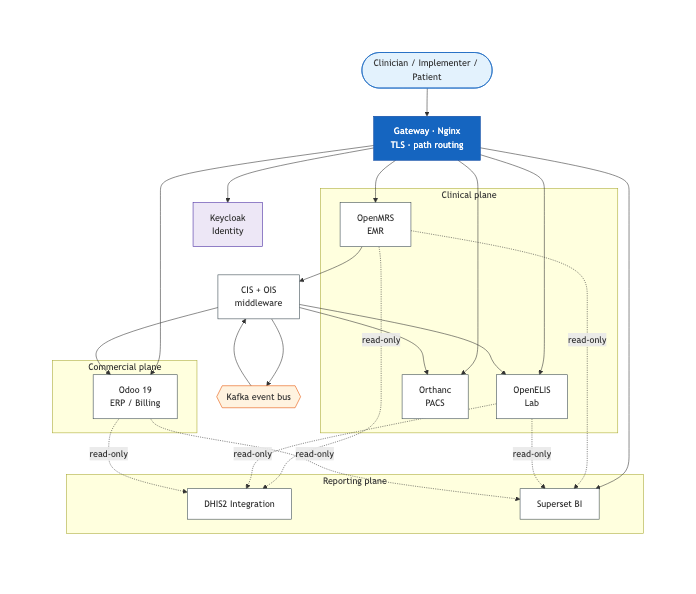
Every component runs as a container on a single private Docker bridge network
(nidan-network). A single gateway (Nginx) is the only externally-exposed surface; it
terminates TLS and routes requests to the right service by URL path. Nothing else is published to
the outside world.
Functionally the system divides into three planes:
| Plane | Owns | Primary systems |
|---|---|---|
| Clinical | Patients, encounters, orders, results, imaging | OpenMRS, OpenELIS, Orthanc |
| Commercial | Billing, pharmacy, inventory, POS, insurance | Odoo |
| Reporting | Aggregate statutory reporting and BI | DHIS2 integration, Superset |
Components and ports
All ports below are internal to nidan-network unless noted. Only the gateway publishes
ports to the host.
| Service | Image / build context | Internal port | Datastore | Role |
|---|---|---|---|---|
| gateway | ./proxy (Nginx) |
80, 443, 8443 (published) | - | Reverse proxy, TLS termination, path routing |
| openmrs-backend | ./openmrs (Tomcat) |
8080 | MariaDB | OpenMRS 2.8 API + custom OMODs |
| openmrs-frontend | ./openmrs/frontend |
80 | - | O3 single-page app (static assets) |
| openmrs-db | mariadb:10.11 | 3306 (host 3307) | - | OpenMRS database (ROW binlog for Debezium) |
| odoo | trigonaltechnology/nidan_odoo | 8069 | PostgreSQL | ERP: billing, pharmacy, inventory, POS |
| odoo-db | postgres:15 | 5432 | - | Odoo database |
| openelis | OpenELIS-Global-2 | 8080 | PostgreSQL | Lab information system backend |
| openelis-frontend | OpenELIS-Global-2/frontend | 80 | - | Lab UI |
| openelis-db | openelis-global-2-database | 5432 | - | Lab database (clinlims) |
| orthanc | orthancteam/orthanc | 8042, 4242 | PostgreSQL | PACS / DICOM store + OHIF viewer |
| orthanc-db | postgres:15 | 5432 | - | Orthanc database |
| nidan-cis | trigonaltechnology/nidan-cis | 8081 | - | Clinical Integration Service |
| nidan-ois | trigonaltechnology/nidan-ois | 8082 | - | Order Integration Service |
| nidan-integration-db | postgres:15 | 5432 | - | CIS/OIS state + Debezium offsets |
| nidan-kafka | cp-kafka:7.5.0 | 9092 | - | Event streaming |
| nidan-zookeeper | cp-zookeeper:7.5.0 | 2181 | - | Kafka coordination |
| nidan-dhis2 | trigonaltechnology/nidan-dhis2-integration | 5000 | MySQL | Federal HMIS / DHIS2 reporting |
| superset | ./superset |
8088 | - | BI dashboards |
| keycloak | quay.io/keycloak | 8080 | - | Centralized identity (optional) |
The gateway and routing
The gateway is the system's front door. It terminates TLS and rewrites incoming paths to the appropriate internal service. Routing is by URL prefix:
| Path | Routes to |
|---|---|
/ |
Dashboard landing page |
/openmrs, /openmrs/spa/ |
OpenMRS backend / O3 frontend |
/odoo |
Odoo |
/openelis/ |
OpenELIS frontend |
/api/OpenELIS-Global/ |
OpenELIS backend (context path preserved) |
/orthanc-container |
Orthanc PACS |
/auth |
Keycloak |
/superset |
Superset |
/cis/, /dhis2/ |
Middleware / reporting endpoints |
Two TLS ports, on purpose
The gateway listens on 443 for the main stack and 8443 specifically for OpenELIS-Global
- the pre-built OpenELIS frontend hard-codes that port for TLS. Do not consolidate them.
OpenELIS context path
The OpenELIS backend runs under SERVER_SERVLET_CONTEXT_PATH=/OpenELIS-Global. The gateway
rewrites /api/OpenELIS-Global/ → openelis:8080/OpenELIS-Global/. The context path must be
preserved end to end - stripping it breaks the lab UI.
Data flows
The system architecture is event-driven. OpenMRS functions as the clinical source of truth. The custom CIS/OIS middleware captures state changes and translates them into Kafka events for downstream processing by commercial, laboratory, and imaging subsystems.
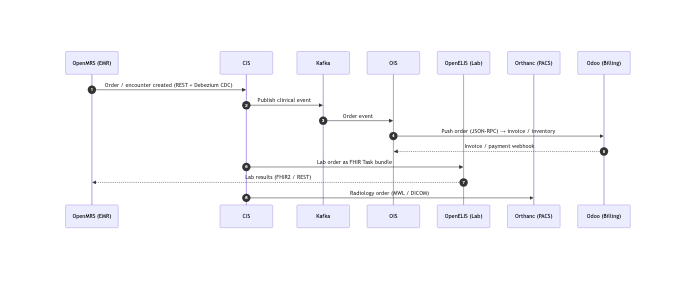
Flow sequence:
- Clinical plane - OpenMRS owns patients, encounters, and orders. CIS converts OpenMRS state into Kafka events and bridges lab orders to OpenELIS (as FHIR Task bundles) and radiology orders to Orthanc (MWL/DICOM).
- Commercial plane - Odoo owns billing, pharmacy, inventory, and POS. OIS consumes order events from Kafka and drives Odoo over JSON-RPC; Odoo posts back invoice and payment state via webhooks.
- Lab results - OpenELIS returns results into OpenMRS via FHIR2 / REST, closing the clinical loop.
- Reporting plane - the DHIS2 integration reads the OpenMRS, OpenELIS, and Odoo databases read-only, aggregates by Bikram Sambat month, and submits to the Federal HMIS / provincial DHIS2. Superset reads the same databases directly for BI dashboards.
The integration boundary owns case conversion
OpenMRS/OpenELIS (Java, camelCase) and Odoo/Postgres (Python, snake_case) name fields differently. Converting between the two is the responsibility of the CIS/OIS middleware, not of the systems on either side.
Identity
Keycloak handles centralized authentication at /auth through the gateway. Subsystems delegate user credentials and service client authentication to Keycloak rather than maintaining independent directories.
Data stores
Each system keeps its own database - there is no shared schema:
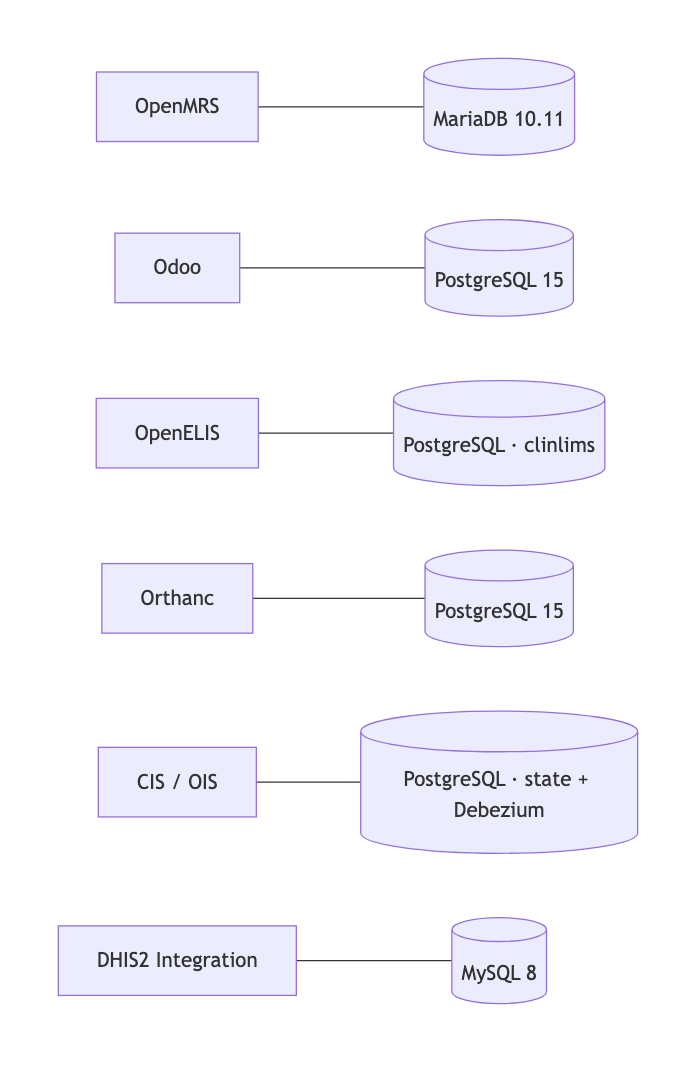
OpenMRS runs on MariaDB
In the current Compose file OpenMRS uses MariaDB 10.11 with ROW-based binlog enabled, which
Debezium/CIS reads for change capture. A PostgreSQL option exists in the Compose file but is
commented out behind an openmrs-postgres profile. The other systems use PostgreSQL (Odoo,
OpenELIS, Orthanc, integration store) or MySQL (DHIS2 reporting).
How it is assembled
The entire stack runs from a single Compose project in nidan-docker/. The deployment process builds custom EMR modules (OMODs) and the frontend assets before baking them into their respective container images. The remaining containers build dynamically during deployment. Refer to Installation for build commands.
Diagrams
The diagrams above are generated from the Mermaid sources in diagrams/*.mmd via
scripts/render_diagrams.py. Edit the .mmd source and re-run the script to update the image.